
Why build another CV builder?
Earlier this year I set out to build a CV builder as a side project. Not because the world is short of them, but because every time I had to update my own CV I ran into the same three problems.
First, most online CV builders are subscription traps. You spend an hour entering your work history, and only when you press download do you learn that the PDF costs a monthly subscription you will forget to cancel. Second, the output tends to look the same everywhere: the same two or three layouts, tuned for one job market. A CV that works in Germany looks wrong in Australia, and a photo that is expected in one country is a liability in another. Third, the writing itself is the hard part. Most tools give you an empty text box for the summary and wish you luck.
I wanted a CV editor with a live PDF preview that updates as you type, templates that respect regional conventions, honest exports, and an AI assistant that helps you write without inventing a career you never had. That project became CVBlender, and this post is the story of how I built it.
The idea behind CVBlender
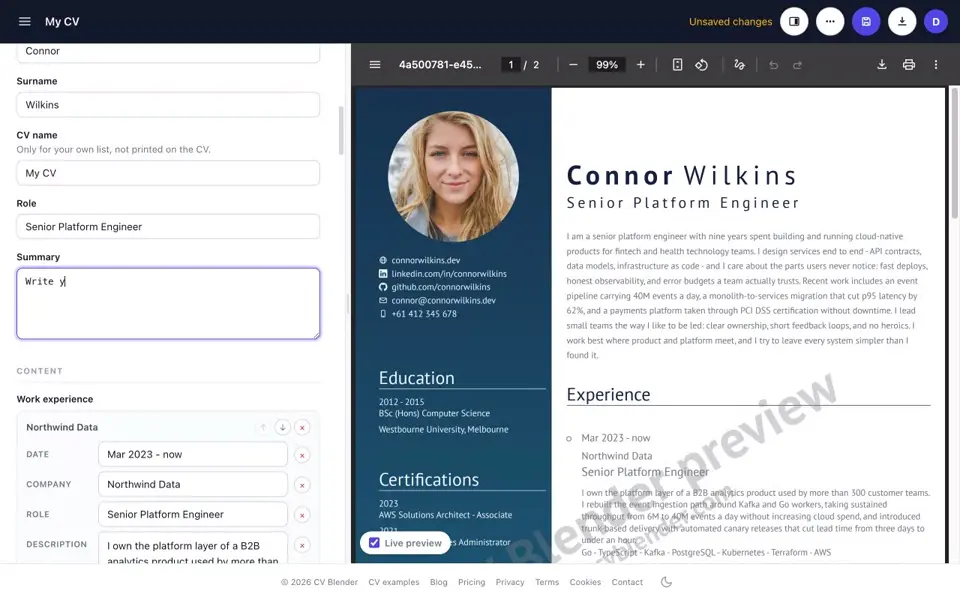
CVBlender is a browser-based CV editor. You fill in structured fields on one side and watch a real PDF render on the other, live, on every keystroke. You pick from templates designed for specific markets, including EU, USA, Canada, Australia and India variants, some of which deliberately omit the photo for markets where anti-discrimination rules make photos a bad idea. You can export a clean PDF or an ATS-friendly Word document, and there is an AI helper that can rewrite a weak summary or restructure your whole CV through chat.
The audience is anyone who updates a CV a few times a year and wants it done in an evening: engineers, nurses, teachers, project managers. The design goal was speed and honesty rather than feature sprawl. No design canvas, no drag and drop, just structured content in, well-typeset document out.
Building the product
Frontend: deliberately boring React
The frontend is a React 19 single-page app in TypeScript, built with Vite. It has almost no runtime dependencies: React, ReactDOM and the AWS Amplify client for auth, and that’s the whole list. There is no state management library, no router library and no CSS framework. Routing is a small hand-rolled hash router, and styling is one plain stylesheet.
That sounds like a flex, but it was a practical decision. A CV editor is one screen with a lot of local state. Every dependency I skipped is a dependency that can’t break a form field two majors from now. The one place this needed real thought was the preview: desktop browsers get the actual PDF bytes in a native iframe viewer, while mobile browsers, which mostly can’t display PDFs inline, get server-rasterized PNG pages with pinch zoom instead. Two renderers, one document.
Backend: Rust, because rendering is the product
The backend is Rust, using the axum web framework. If you’re new to the language, I wrote an introduction to Rust a while back that explains why it appeals to me: you get C-class performance with a compiler that catches whole categories of bugs before they ship.
The heart of the product is a custom CV rendering engine written in Rust, chosen for speed. Live preview only feels live if a full A4 PDF renders in well under a second, including the round trip. The renderer takes the structured CV document plus a template and a color theme and produces the finished PDF, or rasterized preview pages for mobile. Each render runs in its own scratch directory that gets deleted afterwards, so warm server containers never accumulate state and concurrent renders can’t collide.
Word export was its own small adventure. The PDF pipeline emits no Word format, so the .docx exporter is a separate code path that builds the document directly. Every visual template exports to the same single-column Word layout on purpose: recruiters who ask for Word usually feed it to an applicant tracking system, and ATS parsers reward boring layouts.
Infrastructure: serverless AWS, defined as code
CVBlender runs serverless on AWS behind API Gateway, with DynamoDB as a single-table datastore, S3 for uploaded profile images, Cognito for authentication with email and Google sign-in, SES for transactional email and SQS for background work. The frontend is hosted on AWS Amplify. The public contact form sits behind Cloudflare Turnstile so I get messages from humans instead of bots.
Everything is defined as infrastructure as code and deployed from GitHub Actions using OIDC, so no long-lived AWS keys exist anywhere in CI. Dev and production are fully separate stages with their own user pools and data. If you build Rust in CI pipelines, the setup rhymes with what I described in my post on building private Rust crates in CI, with one hard-won addition: everything builds on arm64 runners, because x86 rustc kept crashing under QEMU emulation when building images on Apple Silicon. Going arm64-native fixed the crashes and turned out cheaper too.
One SQS lesson worth passing on: never do slow work inside an auth trigger. Cognito gives a signup hook about five seconds before the signup fails, while a queued event can be slow, can retry and fails loudly. So anything slow, like the three-day grace period account deletion that has to erase Cognito, S3 and DynamoDB records, goes through the queue.
How the AI actually works
The AI layer talks to models through the AWS Bedrock Converse API. Which model sits behind it is a config value, not a code change, which has already paid for itself: swapping models is a one-line edit and a deploy.
There are exactly two AI features, and I fought hard to keep it at two.
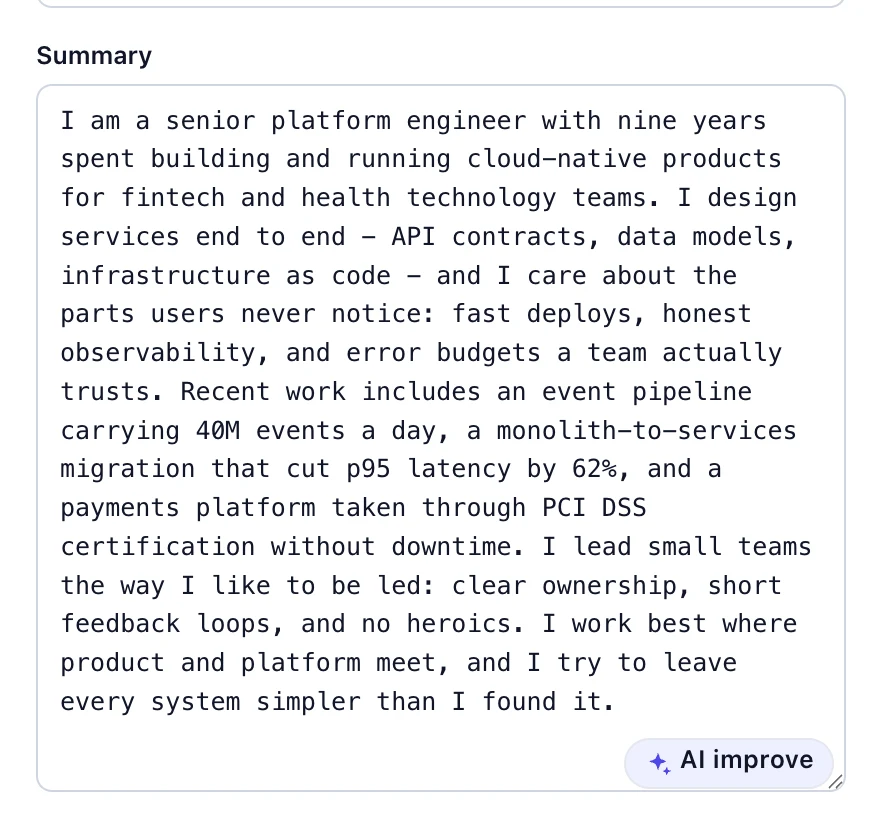
The first is a one-shot improve button on individual fields. Select your summary or a work experience description, press improve, get back a single rewritten line. No chat, no options, no markdown.
The second is an in-editor chat that edits the CV through tool calls. You can ask it to make your summary punchier, reorder sections or tailor the CV to a job ad you paste in. The design rule that shaped everything: the model never writes to the database. The frontend sends the current unsaved document with each message, the model edits an in-memory copy through a fixed set of tools, and the response carries the edited document back. Saving stays a human action, and there’s an undo.
A few decisions here I would defend in any AI product:
- Anti-fabrication rules live in the system prompt and are blunt. The model is told it must never invent employers, dates, degrees or metrics. An AI that pads your CV with fiction is worse than no AI.
- Errors are written for the model, not just the user. The CV content uses a small line-based text format, and untagged lines would be dropped silently by the parser. So the validation tool rejects them and quotes the offending lines back in the error, which lets the model correct itself in the next tool round instead of destroying data.
- No streaming, and bounded everything. API Gateway buffers response bodies, so each chat turn is one request and one response, with a cap on tool rounds and a time budget that returns the edits made so far rather than timing out with nothing.
CVBlender also exposes an MCP server, so you can register it as a custom connector in claude.ai and have Claude list, edit, duplicate and preview your CVs directly. The Model Context Protocol is young, and wiring it into a serverless stack produced the best war stories of the project.
Challenges worth writing down
The CORS trap. API Gateway needs binary media types enabled to serve PDFs and accept image uploads. With that switched on, mock preflight responses break: the gateway tries to treat the mock’s empty body as binary and answers every OPTIONS request with a 500, which browsers report as an opaque CORS failure with no hint of the real cause. The fix was to move CORS handling entirely into the application and give every route an explicit unauthenticated OPTIONS method.
The MCP token-type trap. An OAuth MCP client sends access tokens. A web SPA sends ID tokens. A Cognito authorizer on API Gateway validates only one type per method, depending on whether scopes are configured. Get this wrong and the failure is silent: the connector authenticates fine, every call returns 401, and the client shows no tools available while looking connected. The MCP route had to be carved out as its own resource with its own authorizer settings.
Cognito has no RFC 8414 metadata. MCP clients discover the OAuth setup from a standard metadata document that Cognito simply does not serve. The API ends up publishing its own authorization server document that delegates the actual endpoints to Cognito. Not hard once you know, but nothing tells you this up front.
Headless browsers will not render PDF iframes. The promo video is recorded by a script that drives the real app with Playwright. In headless Chromium the PDF preview iframe renders as a blank rectangle, so the recorder runs a headed browser, and a window pops up on my desktop for the duration of every recording.
Optional subsystems should fail closed, not fail the deploy. Payments, AI, the bot check and the ops queue are all optional per stage. If the config for one is missing, those endpoints answer 503 and everything else works. A half-configured stage still deploys, which makes standing up a fresh environment painless.
Lessons learned
Building CVBlender taught me more about product boundaries than about any single technology.
- Keep the AI stateless and bounded. The chat holds no server-side session, can’t write to storage and runs on budgets. Every scary AI failure mode I could imagine is structurally impossible rather than merely discouraged.
- Write errors for machine consumption. The single best AI improvement wasn’t a better prompt, it was error messages that quote exactly what was wrong so the model can fix its own mistake.
- The boring parts take the longest. The AI features took days. Auth flows, email deliverability, CORS and payment webhooks took weeks. Nobody tweets about SPF alignment, but your signup emails land in spam without it.
- Config-gated features beat feature branches. Shipping dark features behind config flags meant dev and production could differ without diverging code.
- When you fix a nasty bug, write the war story into a code comment. Half of this post was reconstructed from comments I left myself at the crime scenes. Future me is the most grateful reader I have.
What comes next
The near-term list is unglamorous on purpose: more regional templates, a public gallery of example CVs and deeper AI assistance for describing work experience, which is where most people actually get stuck. No roadmap theater, the product grows when there’s something genuinely useful to add.
Closing thoughts
A CV builder looks like a weekend project from the outside. It’s really a rendering engine, a document model, an auth system, a payment flow and an AI editor wearing a trench coat. Building it end to end, from the Rust renderer to the MCP connector, was the most fun I’ve had on a side project in years.
If you want to see the result, try the editor at cvblender.com, the free tier lets you build and download a CV without a subscription. And if you’re building your own AI-assisted SaaS, I hope the traps documented above cost you less time than they cost me.


